产品概述
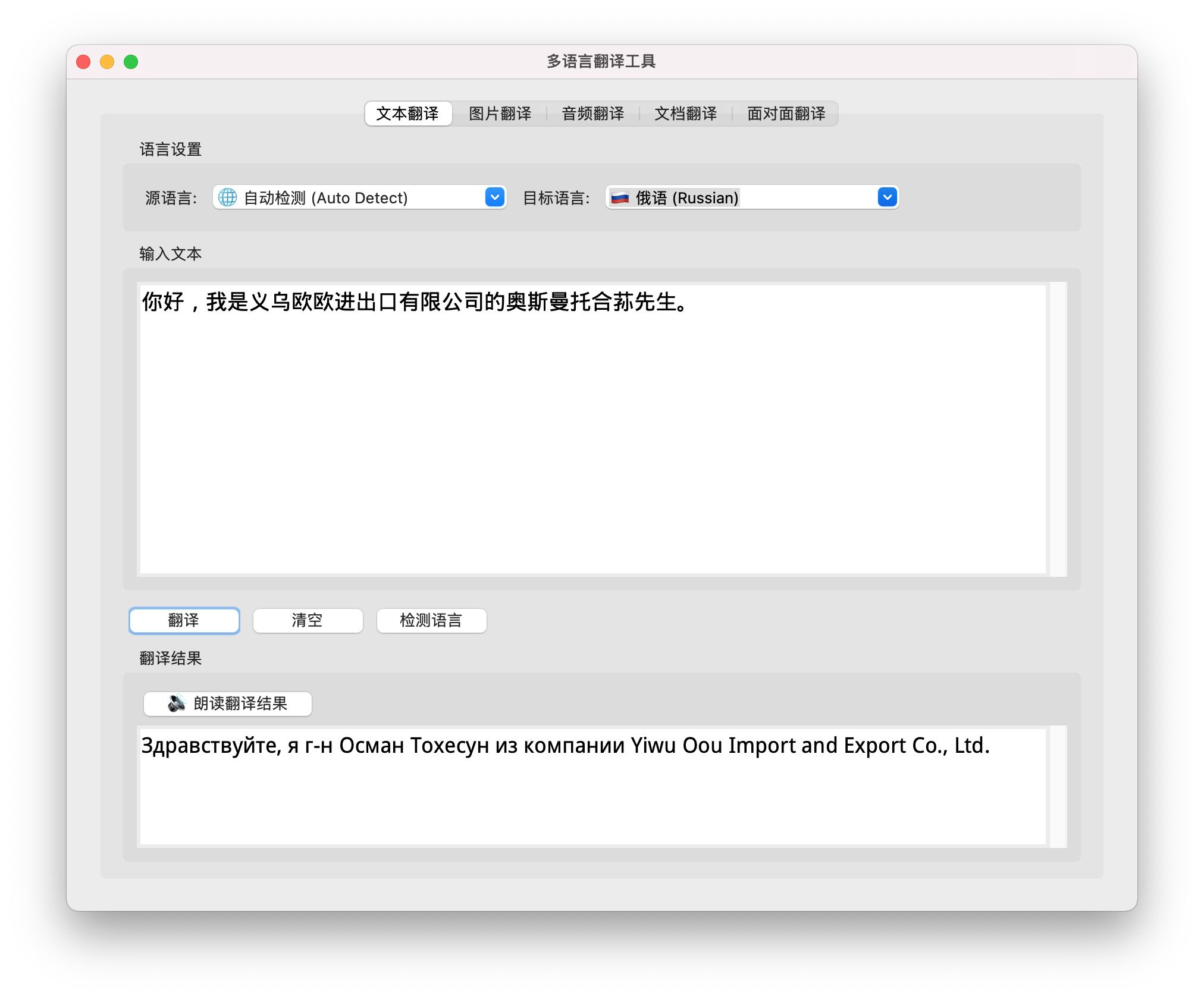
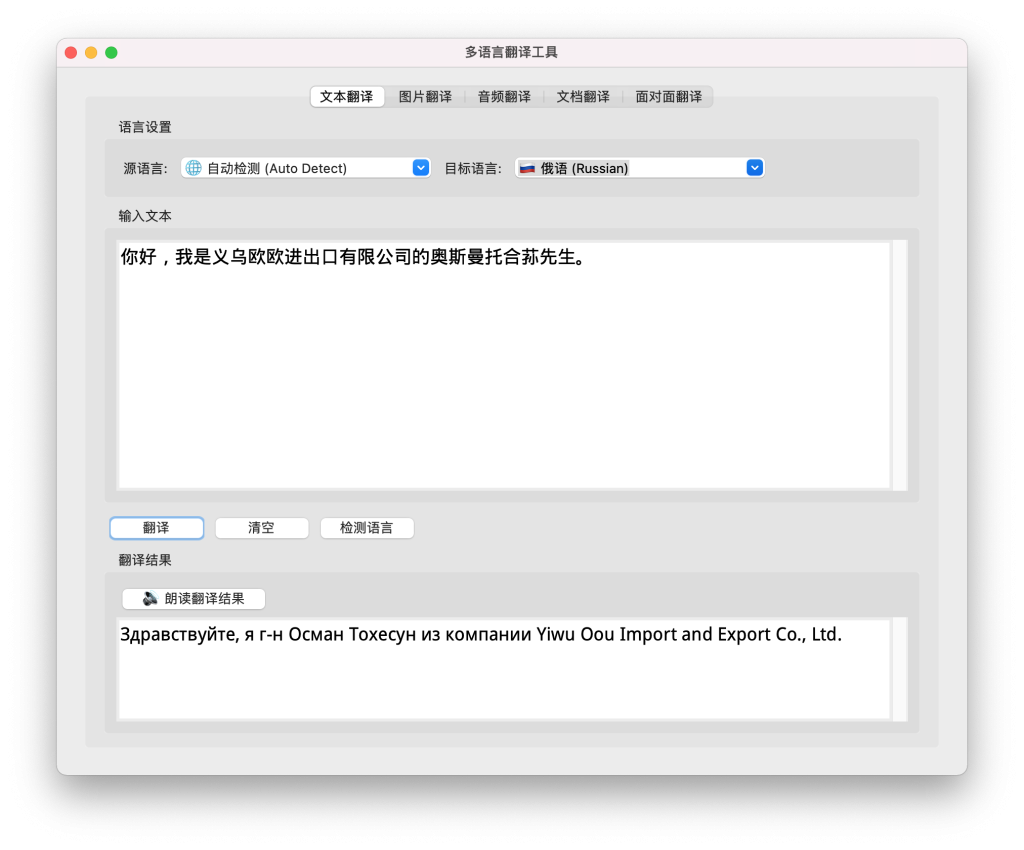
多语言翻译工具 是一款功能强大的跨平台翻译应用程序,由义乌噢欧进出口有限公司开发。软件支持文本、图片、音频、文档和实时对话翻译,采用先进的OCR识别技术、语音识别技术和离线/在线双模式翻译引擎,为用户提供便捷、高效、隐私安全的多语言翻译解决方案。
核心优势
✅ 完全离线运行
- 支持离线模式,无需网络连接即可进行翻译
- 所有翻译在本地完成,数据不上传,保护用户隐私
- 无API限制,免费使用,响应迅速
✅ 多格式支持
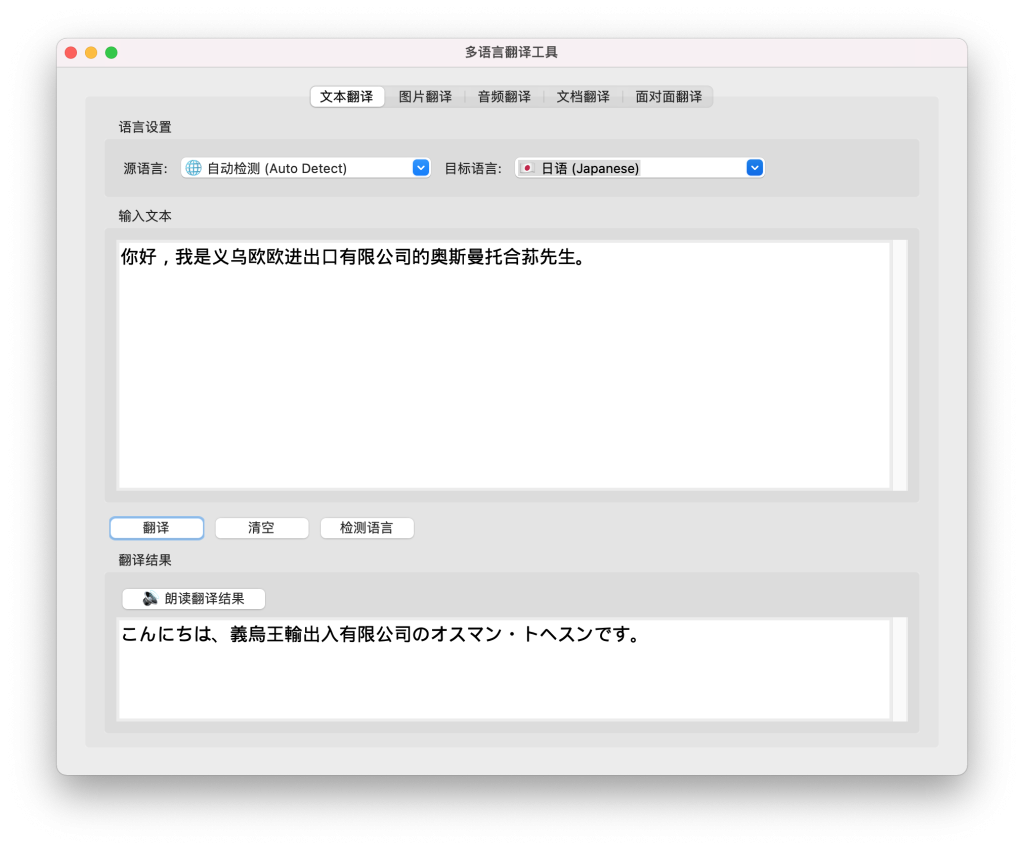
- 文本翻译:支持108+种语言的文本翻译
- 图片翻译:OCR识别图片中的文字,支持批量多图片翻译
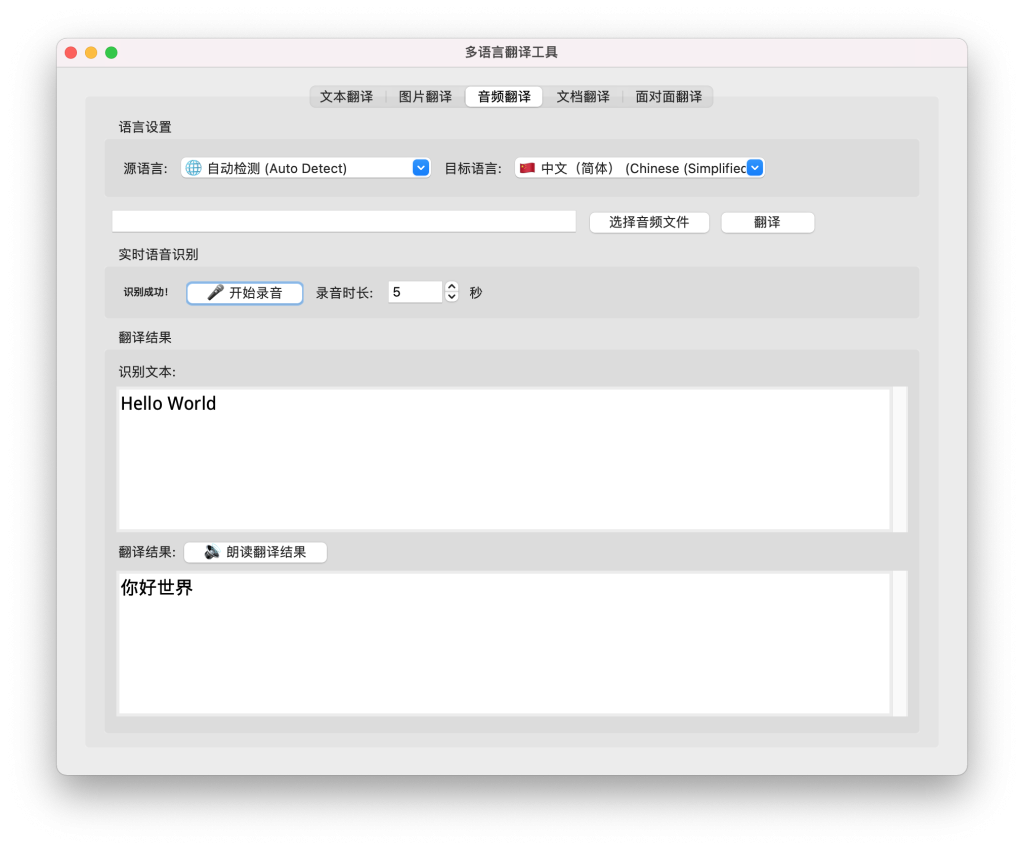
- 音频翻译:支持音频文件翻译和实时语音识别翻译
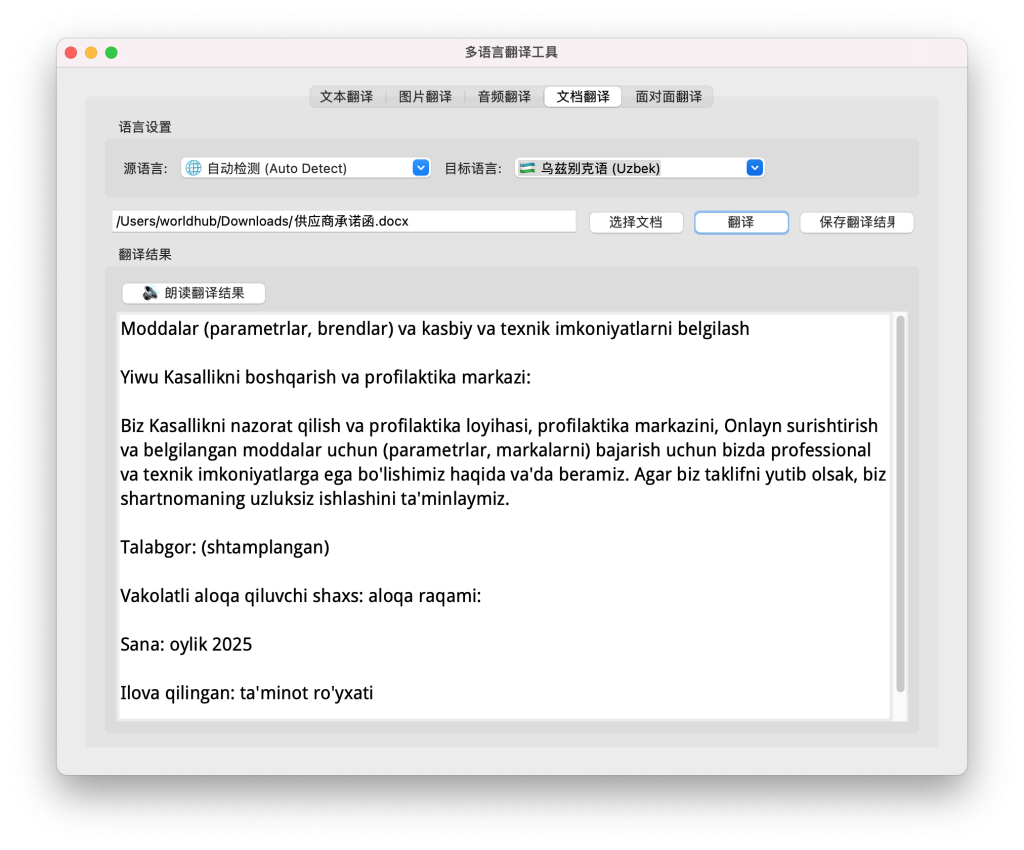
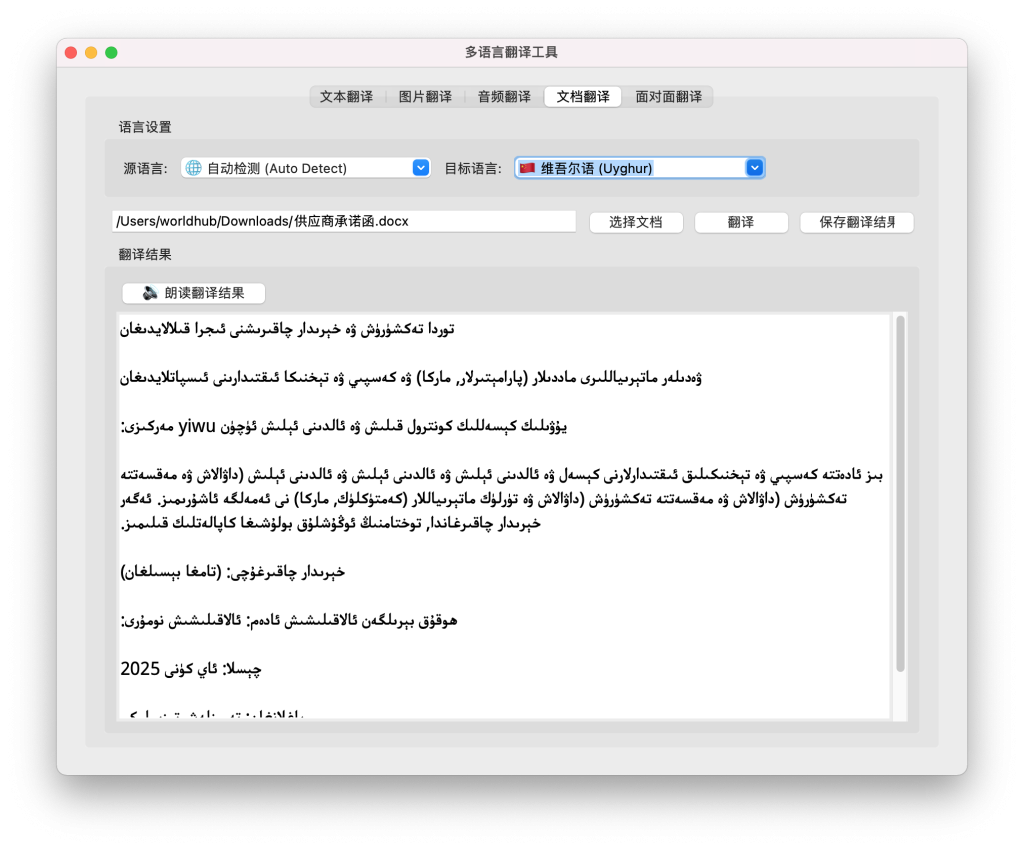
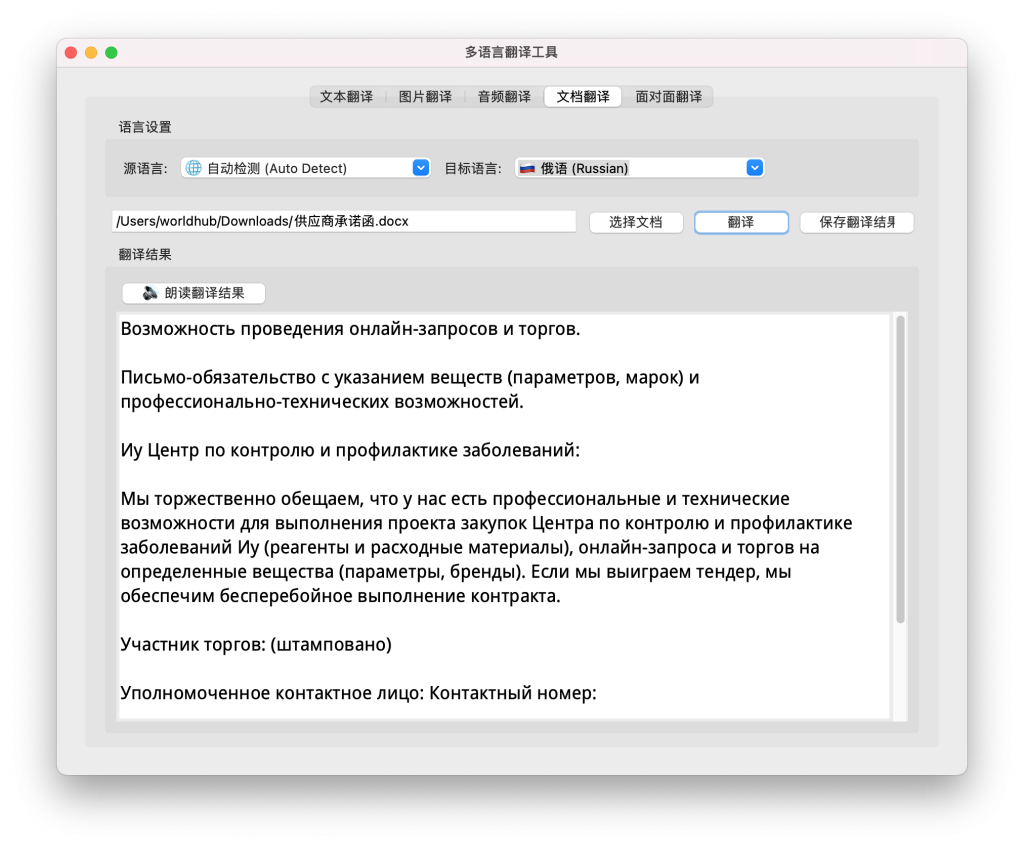
- 文档翻译:支持PDF、DOCX、TXT等格式的文档翻译
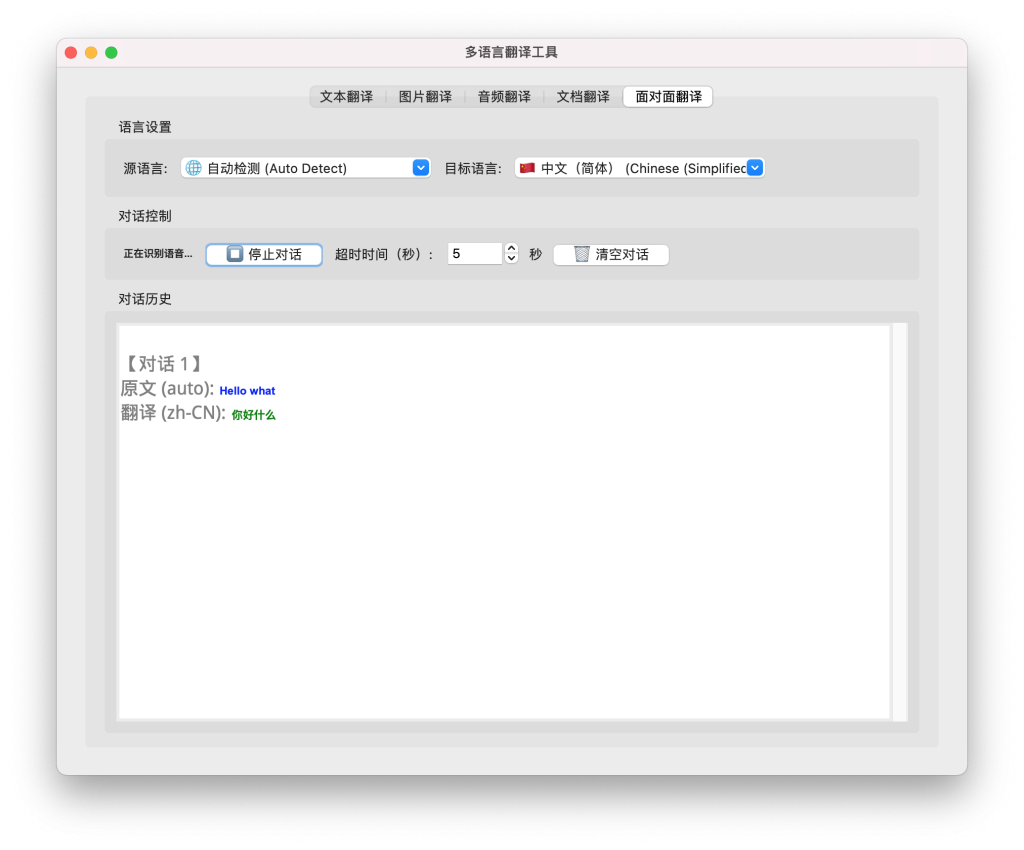
✅ 实时对话翻译
- 面对面交流场景的实时翻译
- 自动识别语音、翻译并朗读
- 连续对话模式,无需重复操作
✅ 多语言界面
- 支持12种界面语言(中文、英文、俄语、德语、法语、印地语、土耳其语、意大利语、阿拉伯语、日语、韩语、泰语、马来语)
- 自动识别并支持从右到左书写的语言(RTL语言)
✅ 个性化设置
- 用户可自定义字体和字体大小
- 自动加载操作系统字体
- 字体设置自动保存
主要功能
1. 文本翻译
- 支持108+种语言的文本翻译
- 自动检测源语言
- 快速准确的翻译结果
- 支持翻译结果语音朗读
2. 图片翻译
- OCR识别图片中的文字
- 支持单图片翻译
- 批量多图片翻译:一次选择多张图片,自动批量处理
- 支持多种图片格式(PNG、JPG、JPEG、BMP等)
- 支持保存批量翻译结果
3. 音频翻译
- 支持音频文件翻译(WAV、MP3、M4A、FLAC、OGG等格式)
- 实时语音识别翻译:通过麦克风实时录音并翻译
- 可设置录音时长(1-30秒)
- 支持多种语言的语音识别
4. 文档翻译
- 支持PDF、DOCX、TXT等格式的文档翻译
- 自动提取文档中的文本内容
- 分页显示翻译结果
- 支持保存翻译结果到文件
5. 面对面翻译
- 实时对话翻译:自动识别语音、翻译并朗读
- 连续对话模式,无需重复点击
- 自动记录对话历史
- 适合面对面交流、会议翻译等场景
6. 文本转语音
- 支持翻译结果的语音朗读
- 支持多种语言的语音输出
- 高质量语音合成
技术特性
翻译引擎
- 离线模式:使用 Argos Translate 离线翻译引擎
- 完全离线运行,无需网络连接
- 隐私保护,数据不上传
- 无API限制,免费使用
- 本地处理,响应迅速
- 在线模式:使用 Google Translate API
- 支持更多语言对
- 翻译质量高
- 需要网络连接
- 自动模式检测:程序启动时自动检测并选择最佳模式
OCR识别技术
- 使用 Tesseract OCR 引擎
- 支持多种语言的文字识别
- 高精度识别率
- 支持批量图片处理
语音识别技术
- 使用 Google Speech Recognition API
- 支持实时语音识别
- 支持多种语言的语音识别
- 高准确率识别
系统要求
最低要求
- 操作系统:Windows 7+ / macOS 10.12+ / Linux (Ubuntu 18.04+)
- Python版本:Python 3.7 或更高版本
- 内存:至少 2GB RAM
- 存储空间:至少 500MB 可用空间(包含语言包)
- 网络:在线模式需要网络连接,离线模式无需网络
可选依赖
- FFmpeg:用于处理某些音频格式(可选)
- PortAudio:用于实时语音识别(可选)
快速开始
方法一:使用启动脚本(推荐)
macOS / Linux:
./start.sh
Windows:
start.bat
启动脚本会自动检查环境、安装依赖并启动应用程序。
方法二:手动安装
- 创建虚拟环境
python3 -m venv venv
source venv/bin/activate # macOS/Linux
venv\Scripts\activate # Windows
- 安装依赖
pip install --upgrade pip
pip install -r requirements.txt
- 安装语言包(离线模式)
python install_language_packages.py
- 运行程序
python main_gui.py
使用说明
文本翻译
- 在”文本翻译”标签页中输入要翻译的文本
- 选择源语言(可选择”自动检测”)和目标语言
- 点击”翻译”按钮
- 翻译结果将显示在下方文本框中
- 点击”🔊 朗读翻译结果”按钮可以听到翻译内容的语音朗读
图片翻译
- 单图片翻译:选择图片 → 选择语言 → 点击翻译
- 批量多图片翻译:选择多张图片 → 选择语言 → 点击批量翻译 → 保存结果
音频翻译
- 音频文件翻译:选择音频文件 → 选择语言 → 点击翻译
- 实时语音识别翻译:设置录音时长 → 点击开始录音 → 对着麦克风说话
文档翻译
- 选择文档(PDF、DOCX、TXT)
- 选择源语言和目标语言
- 点击”翻译”按钮
- 翻译完成后可保存结果
面对面翻译
- 选择源语言和目标语言
- 设置录音时长(1-30秒)
- 点击”🎤 开始对话”按钮
- 对着麦克风说话,系统会自动识别、翻译并朗读
- 可以连续进行多轮对话
字体设置
- 点击菜单栏”设置” > “字体设置”
- 选择字体和字体大小
- 点击”应用字体”按钮
- 字体设置会自动保存
支持的语言
本工具支持 108+ 种语言,包括:
- 中文(简体/繁体)
- English
- 日本語
- 한국어
- Français
- Deutsch
- Español
- Italiano
- Русский
- العربية
- Português
- ไทย
- Tiếng Việt
- हिन्दी
- Nederlands
- Polski
- Türkçe
- 以及其他 80+ 种语言
版本信息
当前版本: 1.0
更新内容:
- ✅ 支持离线/在线双模式翻译
- ✅ 支持批量多图片翻译
- ✅ 支持实时语音识别翻译
- ✅ 支持面对面对话翻译
- ✅ 支持12种界面语言
- ✅ 支持RTL语言自动识别
- ✅ 支持字体自定义
- ✅ 支持文本转语音功能
- ✅ 程序持续升级更新
版权信息
版权所有 © 2024
开发者:
- 义乌噢欧进出口有限公司
- Yiwu OOU Import and Export Co.,Ltd
官方网站:
- silubaba.com.cn
联系邮箱:
- work@silubaba.com.cn
联系方式
技术支持:
- 邮箱:work@silubaba.com.cn
- 网站:silubaba.com.cn
反馈与建议:
欢迎通过邮箱向我们反馈问题或提出建议。
更新通知:
程序持续升级更新,请关注官方网站获取最新版本。
感谢使用多语言翻译工具!
程序持续升级更新,敬请关注!
Product Overview:
Multilingual Translator is a powerful cross-platform translation application developed by Yiwu Oou Import & Export Co., Ltd. The software supports text, image, audio, document, and real-time conversation translation, using advanced OCR recognition technology, speech recognition technology, and offline/online dual-mode translation engines to provide users with convenient, efficient, and privacy-safe multilingual translation solutions.

Core strengths
Completely offline
- Supports offline mode for translation without a network connection
- All translations are done locally, and no data is uploaded, protecting user privacy
- No API restrictions, free to use, and responsive
Multi-format support
- Text Translation: Supports text translation in 108+ languages
- Image translation: OCR recognizes text in images and supports batch multi-image translation
- Audio Translation: Supports audio file translation and real-time speech recognition translation
- Document translation: Supports document translation in PDF, DOCX, TXT, and other formats
Real-time conversation translation
- Real-time translation of face-to-face communication scenarios
- Automatically recognize speech, translate and read aloud
- Continuous conversation mode without repeating operations Multilingual interface
- Support 12 interface languages (Chinese, English, Russian, German, French, Hindi, Turkish, Italian, Arabic, Japanese, Korean, Thai, Malay)
- Automatically recognizes and supports right-to-left written languages (RTL languages)
Personalization
- Users can customize fonts and font sizes
- Automatically loads operating system fonts
- Font settings are automatically saved
Key features:
1. Text translation
- Supports text translation in 108+ languages
- Automatically detect the source language
- Fast and accurate translation results
- Supports voice reading of translation results
2. Image translation
- OCR recognizes text in images
- Supports single image translation
- Batch Multi-Image Translation: Select multiple images at once and automatically batch them
- Support multiple image formats (PNG, JPG, JPEG, BMP, etc.)
- Supports saving batch translation results
3. Audio translation
- Supports audio file translation (WAV, MP3, M4A, FLAC, OGG, etc.)
- Real-Time Speech Recognition Translation: Record and translate in real-time through the microphone
- Recording duration can be set (1-30 seconds)
- Support speech recognition in multiple languages
4. Document translation
- Supports document translation in PDF, DOCX, TXT and other formats
- Automatically extract text content from documents
- Pagination displays the translation results
- Supports saving translation results to files
5. Face-to-face translation
- Real-Time Conversation Translation: Automatically recognizes speech, translates, and reads aloud
- Continuous conversation mode without repeated clicks
- Automatically record conversation history
- It is suitable for face-to-face communication, meeting translation and other scenarios
6. Text-to-speech
- Supports voice reading of translation results
- Supports voice output in multiple languages
- High-quality speech synthesis
Technical characteristics:
Translation engine
- Offline Mode: Use the Argos Translate offline translation engine
- Operates completely offline, no network connection required
- Privacy protection, data is not uploaded
- No API restrictions, free to use
- Local processing and quick response
- Online mode: Use the Google Translate API
- Support for more language pairs
- High quality translations
- An internet connection is required
- Automatic Mode Detection: Automatically detects and selects the best mode when the program starts
OCR recognition technology
- Use the Tesseract OCR engine
- Supports text recognition in multiple languages
- High accuracy recognition rate
- Supports batch image processing
Speech recognition technology
- Use the Google Speech Recognition API
- Support real-time speech recognition
- Support speech recognition in multiple languages
- High accuracy recognition
System requirements:
Minimum requirements:
- Operating System: Windows 7+ / macOS 10.12+ / Linux (Ubuntu 18.04+)
- Python version 😛 ython 3.7 or higher
- Memory: At least 2GB RAM
- Storage: At least 500MB free space (including language packs)
- Network: Online mode requires a network connection, while offline mode does not require a network
Optional dependencies
- FFmpeg: For handling certain audio formats (optional)
- PortAudio: for real-time speech recognition (optional)
Get started quickly
Method 1: Use a startup script (recommended)
macOS / Linux:
./start.sh
Windows:
start.bat
The startup script automatically checks the environment, installs dependencies, and launches the application.
Method 2: Manual installation
- Create a virtual environment
python3 -m venv venv
source venv/bin/activate # macOS/Linux
venv\Scripts\activate # Windows
- Install dependencies
pip install --upgrade pip
pip install -r requirements.txt
- Install language packs (offline mode)
python install_language_packages.py
- Run the program
python main_gui.py
Instructions for use:
Text translation
- Enter the text you want to translate in the Text Translation tab
- Select the source language (with the option of Auto-Detect) and the target language
- Click the “Translate” button
- The translation results will be displayed in the text box below
- Click the “Read Translation Result” button to hear the translated content read aloud
Image translation
- Single image translation: Select the image → Select the language → Click Translate
- Batch Multi-Image Translation: Select multiple images → Select language → Click Batch Translate → Save the result
Audio translation
- Audio File Translation: Select the audio file → Select the language → Click Translate
- Real-time speech recognition translation: Set the recording duration → Click Start recording → Speak into the microphone
Document translation
- Select Documents (PDF, DOCX, TXT)
- Select the source and target languages
- Click the “Translate” button
- Save the results after the translation is complete
Face-to-face translation
- Select the source and target languages
- Set the recording duration (1-30 seconds)
- Click on the “Start Conversation” button
- Speak into the microphone, and the system will automatically recognize, translate and read aloud
- Multiple rounds of conversation can be conducted in a row
Font settings
- Click on the menu bar “Settings” > “Font Settings”
- Choose a font and font size
- Click the “Apply Font” button
- Font settings are automatically saved
Supported languages
The tool supports 108+ languages, including:
- Chinese (Simplified/Traditional)
- English
- Japanese
- 한국어
- Français
- Deutsch
- Español
- Italiano
- Русский
- العربية
- Português
- ไทย
- Tiếng Việt
- हिन्दी
- Nederlands
- Polski
- Türkçe
- and 80+ other languages
Version information
Version: 1.0
Updates:
Support offline/online dual-mode translation
- Support batch multi-image translation
- Support real-time speech recognition translation
- Face-to-face conversation translation is supported
- Support 12 interface languages
- Support RTL language automatic recognition
- Font customization is supported
- Text-to-speech function is supported
- The program is continuously upgraded and updated
Copyright information
© Copyright 2024
Developers:
- Yiwu Oou Import and Export Co., Ltd
Official website:
- silubaba.com.cn
Contact Email:
- work@silubaba.com.cn
Contact information
Technical support:
- Email: work@silubaba.com.cn
- Website: silubaba.com.cn
Feedback and suggestions:
Welcome to feedback questions or suggestions to us via email.
Update Notice:
The program is continuously upgraded and updated, please pay attention to the official website to get the latest version.
Thanks for using the multilingual translation tool!
The program is constantly being upgraded and updated, so stay tuned!

Leave a Reply
You must be logged in to post a comment.